Download Windows 10 Update Assistant Latest Version UPDATED
Download Windows 10 Update Assistant Latest Version
Summary :

Now Windows 10 May 2019 Update, version 1903 is available. You lot can upgrade the new version by Windows ten Update Banana if your device hasn't received the update through Windows Update. Browse the official website of MiniTool to become more than details.
Quick Navigation :
- About Windows 10 Update Assistant
- How to Upgrade to the Latest Windows 10 Version by Windows ten Update Banana
- Dorsum up Files Before Updating by the Free Software - MiniTool ShadowMaker
- Lesser Line
- Windows 10 Upgrade Assistant Download FAQ
- User Comments
Well-nigh Windows 10 Update Banana
The accessible and convenient tool designed past Microsoft - Windows 10 Upgrade Assistant, which allows yous to download and install the latest version of Windows 10 on your computer by a few mouse clicks and the process won't make your files lose.
Even though many other users out there take installed the Windows 10 update without incidents, I strongly propose that you had meliorate have the fourth dimension to exercise a arrangement fill-in before I go farther.
The latest updates tin can be downloaded and installed on your device past the Windows 10 Update Banana. Feature updates such every bit, the Windows 10 May 2019 Update (version 1903) offer new functionality, which tin assist keep your systems secure. Later on you lot download Windows 10 Update Assistant, you'll get these new updates automatically.
In addition, y'all can update Windows x yourself if you desire to check for quality updates or if you don't want to wait for an automated update. And you tin can defer updates — get to Windows 10 servicing options if you're an IT Professional.
Tip: If you need to know which version of Windows x is installed on your organization, you can click the Start button, select Settings option, navigate to Organization and select Near to check.
How to Upgrade to the Latest Windows 10 Version past Windows 10 Update Banana
Windows 10 version 1903 provides all the latest feature improvements and security enhancements for your Windows device.
The latest Windows x version on your Windows PC can be installed by several methods. Of form, the near common method is to use the built-in feature named Windows Update, which is bachelor from the Settings menu.
But if you lot are one of the unfortunate people whose Windows device or figurer is stubbornly refusing to get the official Windows Update from the Microsoft servers, then fret non, you can try the following solution – Windows x Update Banana.

Many Windows operating systems (near are Windows Server) are said to exist vulnerable to IIS resource exhaustion DoS attacks.
You tin can run the tool yourself past merely visiting the Windows 10 software download website and post-obit the instructions on the site for installing the latest version of Windows ten. Here is how to utilize Windows 10 Update Banana to upgrade to the latest version of Windows 10.
Step i: You demand to visit the official website and click the Update now button on the folio. Then the 719-bytes exe file volition be downloaded to your estimator.

Tip: Yous can also download the Media Creation Tool from the same Windows x download page, which allows you to download the total ISO paradigm of Window 10 version 1903 and create physical install media on a USB bulldoze or DVD for a make clean install.
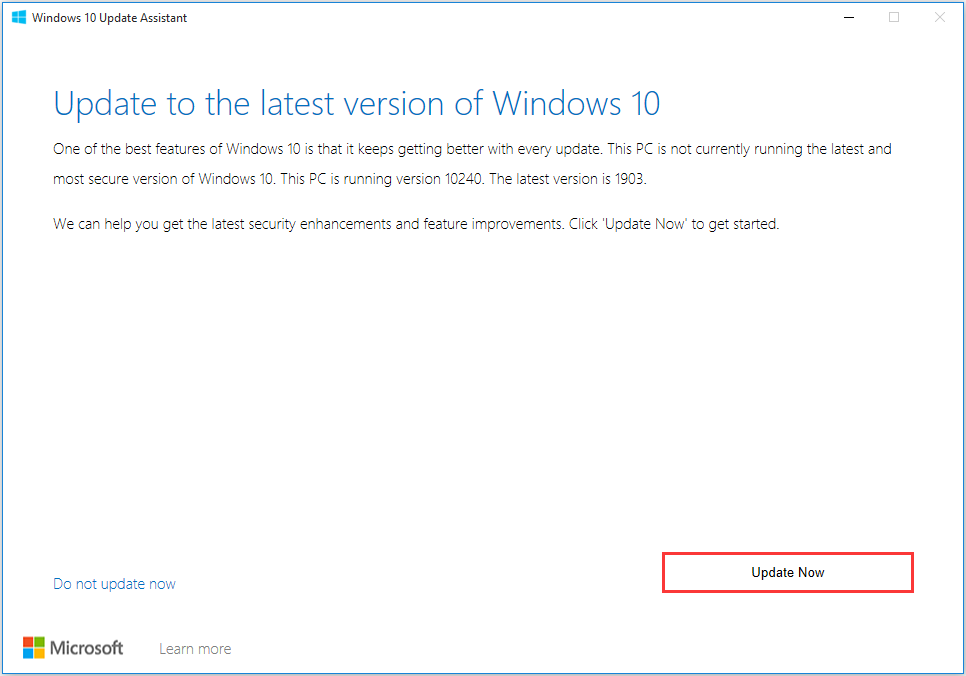
Step 2: When you run the tool, you will see the main screen of the tool. It will check for updates automatically so you tin can click Update Now to start the process.
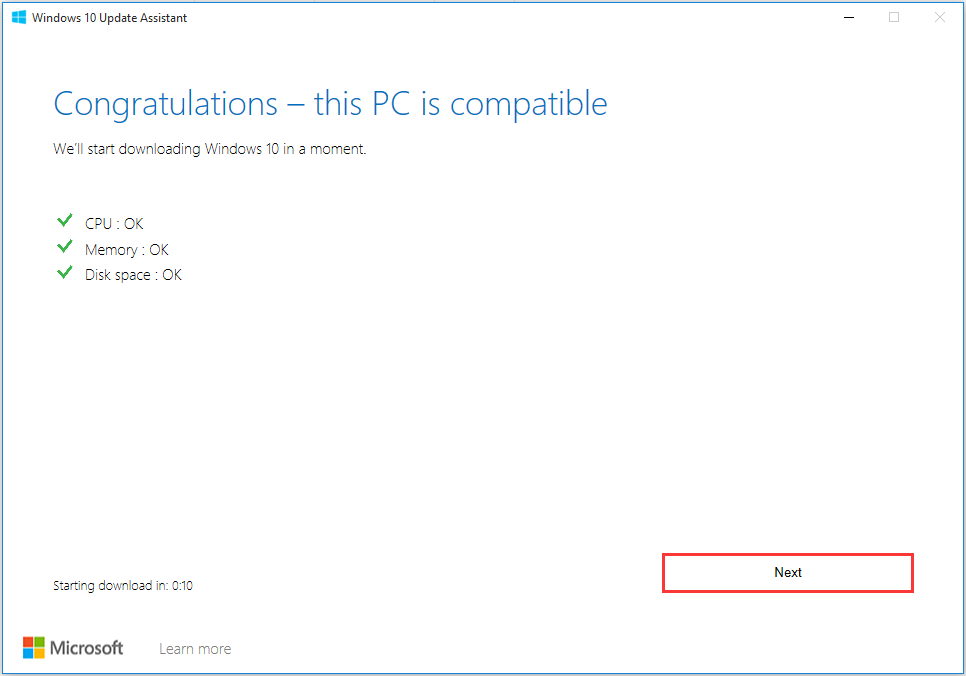
Step 3: Then there volition be some requirements test for your device, which means it volition check if the CPU and memory configuration is up to par and if in that location is enough available deejay space. If all appears well, you tin click Next to continue.
Footstep iv: Then Windows 10 Update Assistant volition starting time to download files. Since this installation will take some fourth dimension, you can click Minimise and proceed to do your own piece of work.
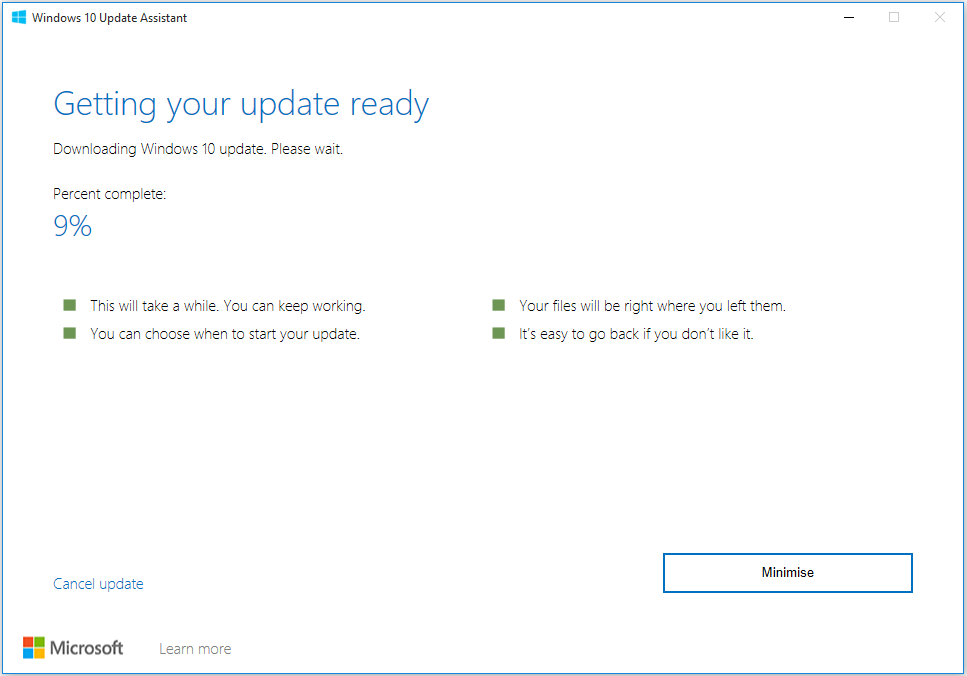
Tip: All of your files volition be safe and right where you left them during the whole upgrade procedure. And you tin choose when to beginning your update. Also, if you don't similar it, you can go back to the previous version of Windows 10 anytime.
Step v: When the update process is completed, you will exist prompted to click Restart at present to allow the changes to take effect. If everything goes well, your reckoner should be running the latest bachelor Windows x version later on the reboot.
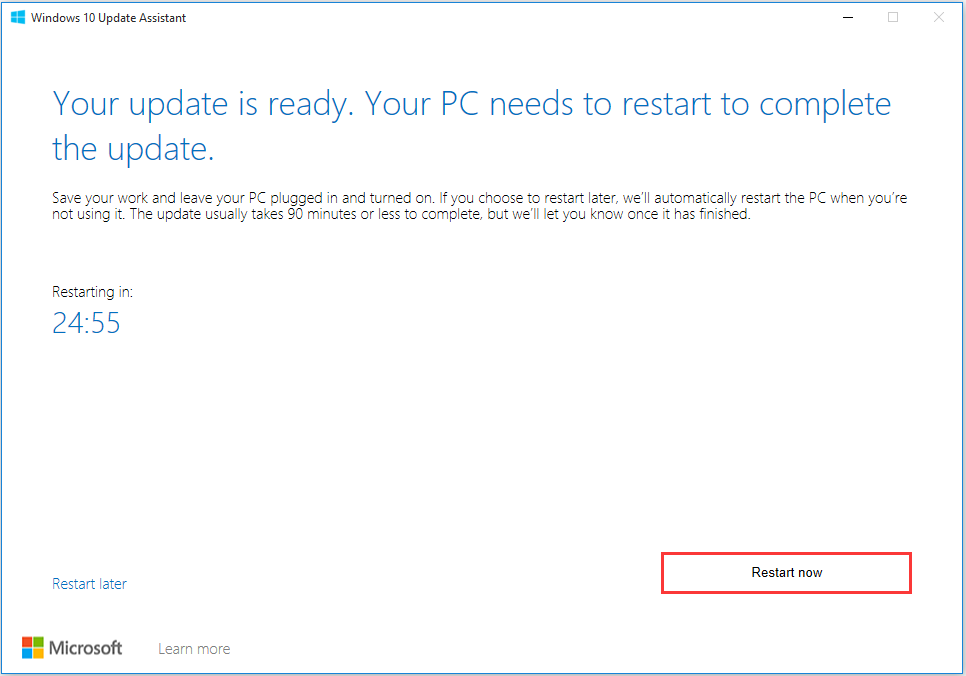
Tip: You can also cull Restart later to permit the changes to take effect after.
Further Reading:
What's new in this new version? What can y'all get in this version afterwards y'all update it?
In improver to security and performance improvements, the update includes new features such as new lightweight themes, Windows Sandbox for application testing, and the ability to pause updates (including the Home version).
Hither are some other features of Windows ten version 1903:
- Speed improvements (thanks to better spectre fixes)
- Cortana and the Search Bar are separating
- The Start Menu back up searching all Your PC's files
- Windows 10 lets you lot uninstall more built-in applications
- vii GB of your PC's storage reserved for updates
- A less cluttered default Outset Menu
Tip: If you are worried about the safety of Windows 10 version 1903, read the post - Is It Prophylactic to Install Windows 1903? Perhaps, This Postal service Gives You Some Tips.
Before upgrading to the latest version of Windows 10, you lot had ameliorate make certain that you have backed up important information and organisation. This performance volition help you restore files and recover your arrangement when the organization crashed.
I volition introduce the tertiary-party gratis backup software: MiniTool ShadowMaker for you. The program has lots of advanced fill-in features which allows you to back up important data and system in simple steps.
Here are more details about MiniTool ShadowMaker. This free fill-in software is designed for Windows ten/8/7, which can provide data protection & disaster recovery solution for you.
This freeware is flexible, which enables you to back upwardly files, Windows operating arrangement, deejay, and sectionalization automatically to an external hard drive, wink drive, thumb bulldoze, pen bulldoze, NAS, etc. on a regular ground.
In add-on, in that location are three types of backup on this software: total backup, incremental backup, and differential backup. You tin choose one of the backup types based on your need. Simultaneously, disk management tin can exist enabled. All in all, this software tin can run across any of your demands.
This Windows fill-in software offers a Trial Edition that allows xxx-solar day free trial for all backup features. If you want to use it permanently, get its Pro Edition. At present you can download and try MiniTool ShadowMaker Trial Edition to support your system.
Free Download
Now, let'south meet how to back upward your Windows system after y'all upgrade to Windows x latest version.
Step one: Decide a Fill-in Mode
- Launch MiniTool ShadowMaker.
- Keep using the trial edition.
- Please choose the computer to manage past clicking Local or Remote and click Connect to enter the main interface.

Step ii: Cull Fill-in Source
- Click Source under the Backup folio and so select the source blazon - Disk and Partitions.
- Select the arrangement deejay where Windows 10 is installed from the following combo box and check all the partitions, click OK.


Step 3: Choose a Destination Path to Store Your Organisation.
- MiniTool ShadowMaker allows you to support your system to an external hard drive, USB wink bulldoze, NAS and more.
- Choose one destination path to shop your system based on your needs and click OK.
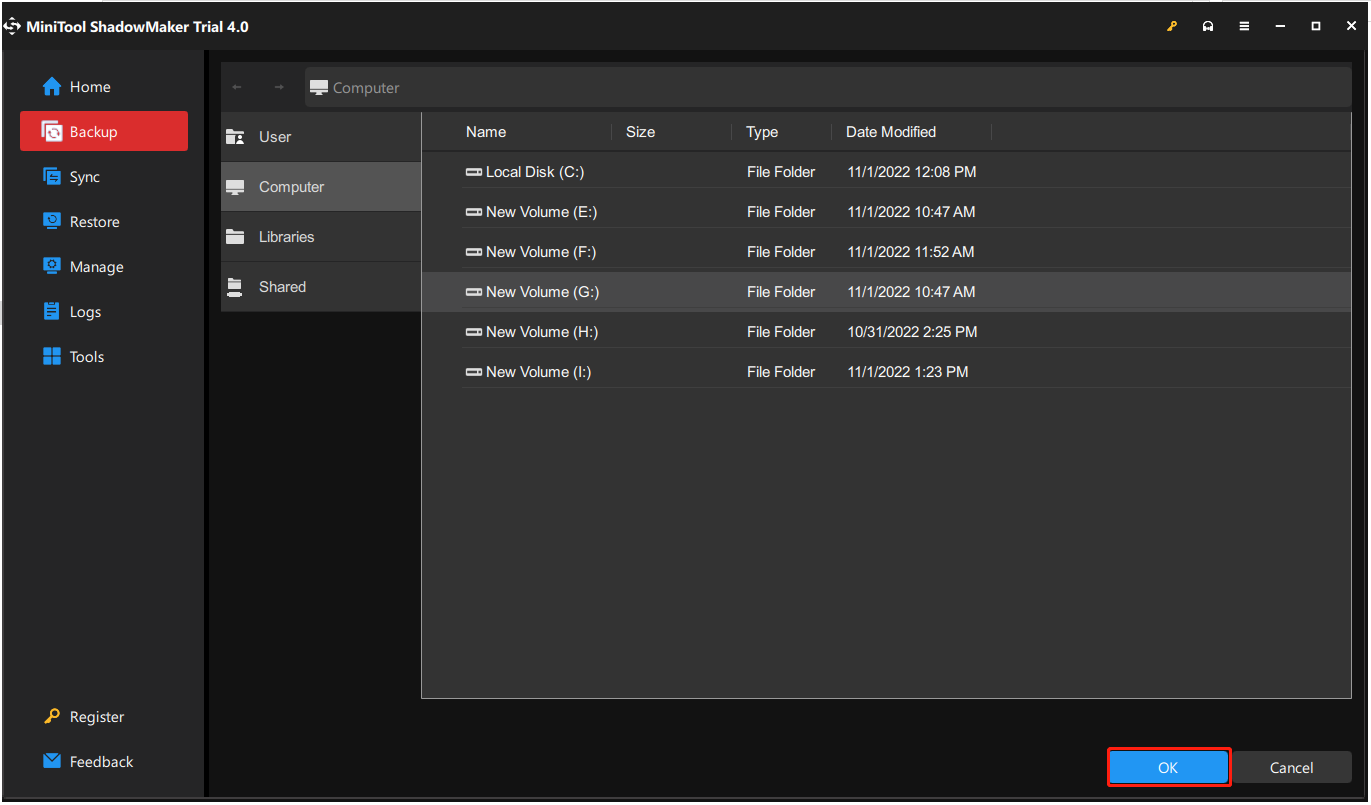
Note: Please exercise not save a volume image file to the volume beingness backed upward. The disk that used to store organisation must have enough storage space.
Step 4: Starting time to Back up
- Become back to the following interface.
- You have two options: start the backup process immediately by clickingBack up Now or delay the backup by choosingSupport Later.
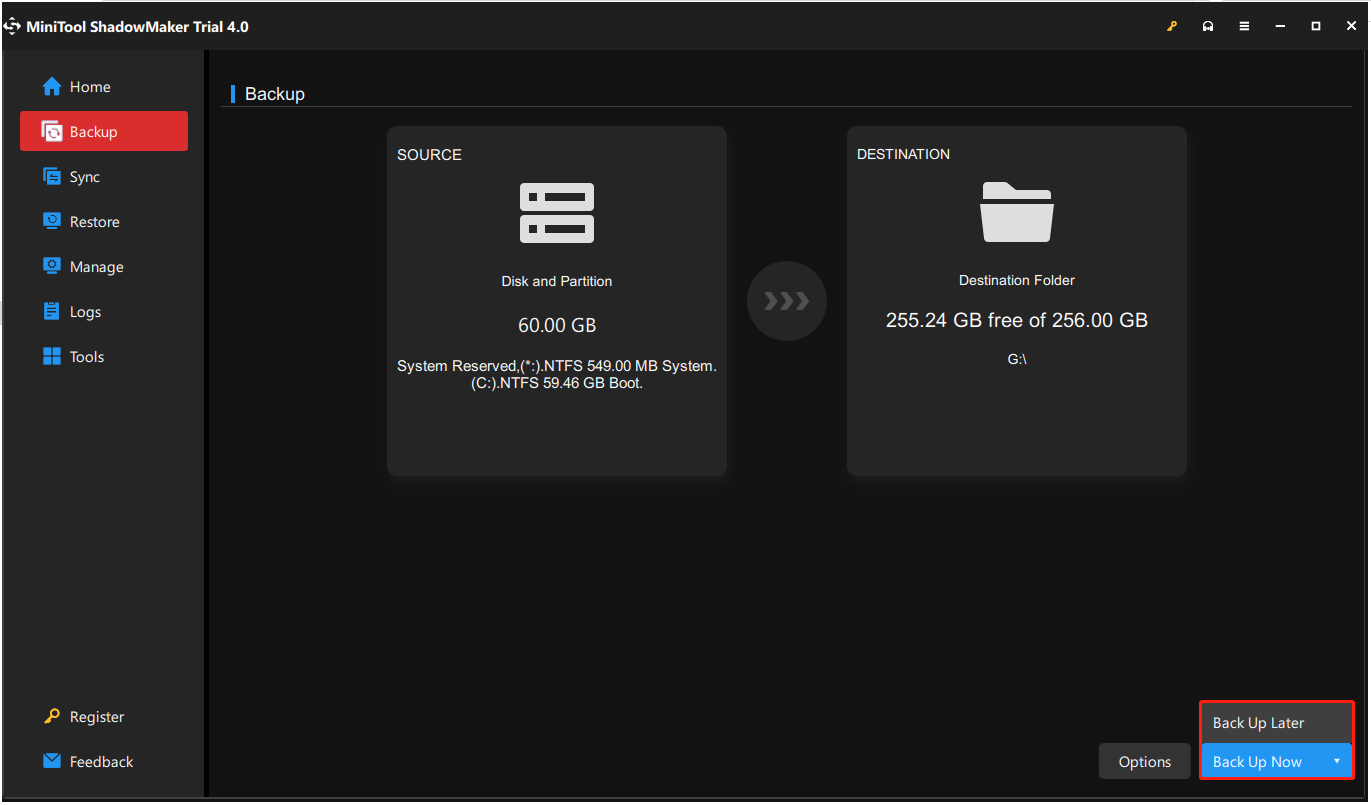
Tip:
1.Y'all can click Schedule in the Fill-in folio to back up your files automatically. After turning this feature on, information technology can dorsum up your important files regularly to specify a fourth dimension point.
two.When your Windows system can't kicking, you tin can use the created system epitome to perform a organisation image recovery, read this postal service - Easily Restore System Image from External Hard Drive in Windows 10/viii/7.
Hither are all the steps of how to back up system by MiniTool ShadowMaker.
Farther Reading
In addition to the method mentioned higher up, here is another method to support disk information by using MiniTool ShadowMaker, which is to clone disk.
Y'all can also use information technology to back upwardly the entire computer to the flash drive via disk cloning. This feature allows you to transfer everything to another drive, such as Windows system, files, settings, applications, and data.
Free Download
Here are the steps of cloning deejay. It's also easy to operate that just need to click some steps.
Step 1: Connect the USB flash drive to your computer. Delight click the Clone Deejay characteristic in theTools folio to proceed after launching MiniTool ShadowMaker.

Footstep 2: Y'all demand to cull the arrangement disk where Windows 10 is installed as the source disk and choose a USB bulldoze as a target disk.
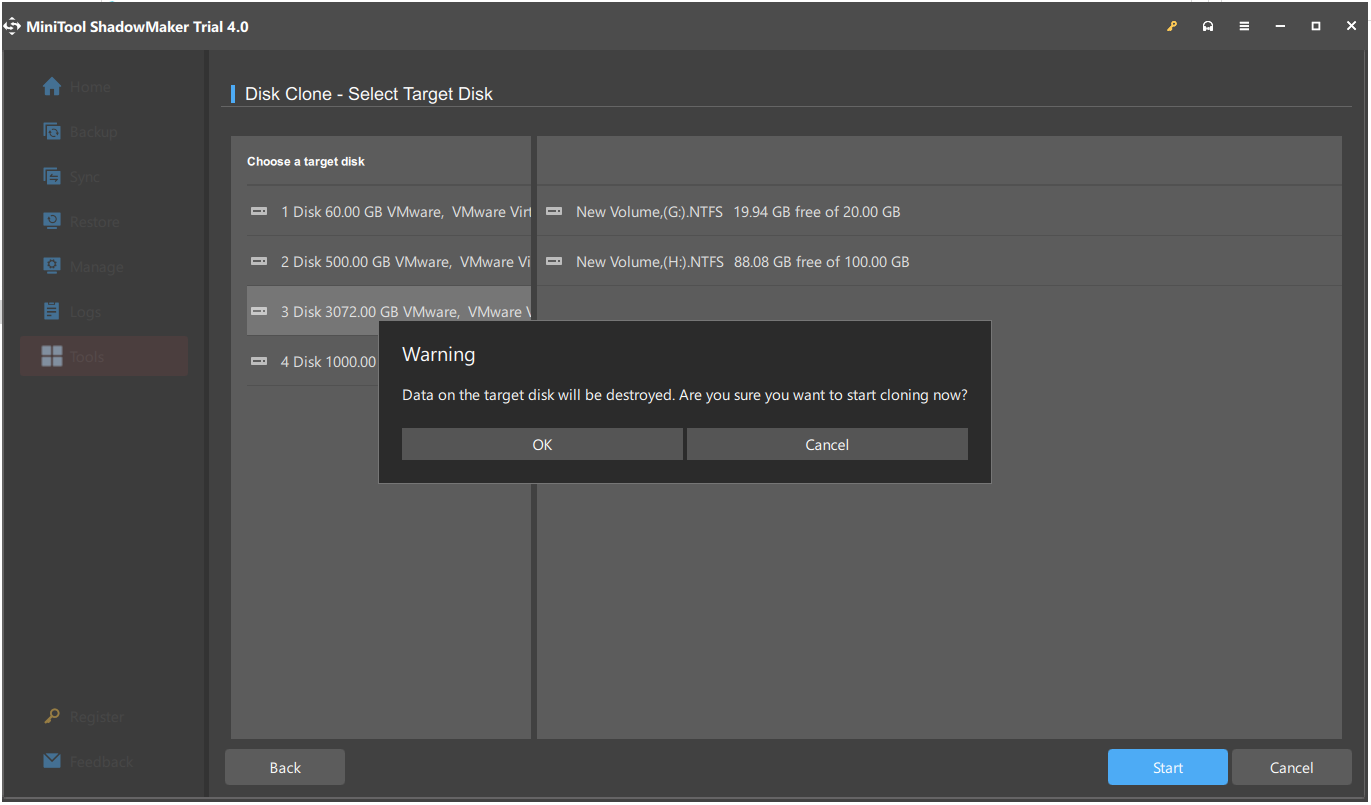
Annotation:
1.The process of cloning disk will destroy information on the target disk, so please make sure that no important files are saved on information technology.
2.The USB flash drive should have enough space to save all the information and data on the cloned system disk.
Step iii: Now this backup software is cloning Windows ten system disk to the USB wink drive. You can plug the USB drive from the computer subsequently the cloning process is completed. Past this way, all the system deejay information is backed up to the USB drive.
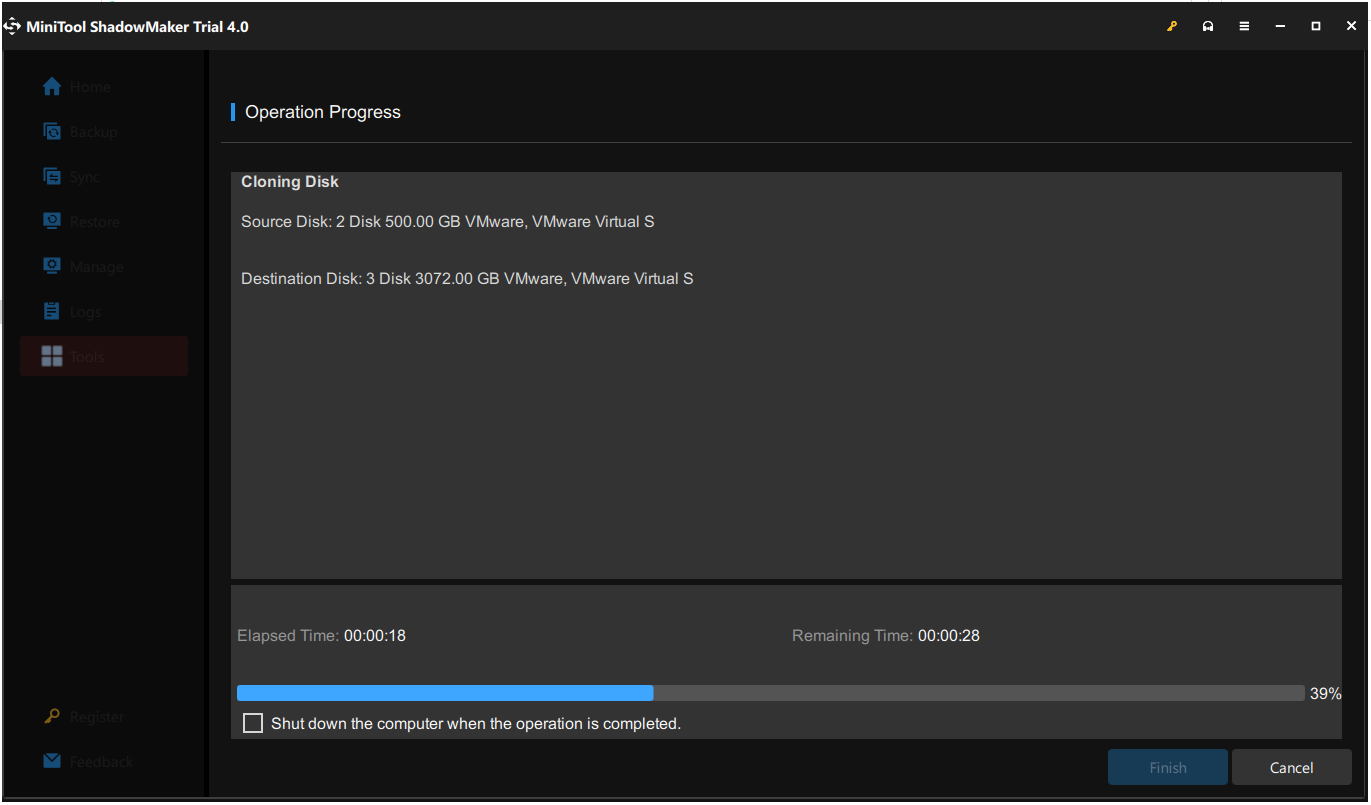
Annotation: You tin can cull to back up Windows 10 to USB drive or clone organization disk to a USB bulldoze to continue your Windows system from system breakdown. Simply the latter one is more suitable for the unabridged disk data protection. Please choose a proper ane based on your needs.
Here are all almost Windows 10 Update Banana and how to update Windows x version 1903. Indeed, MiniTool ShadowMaker tin can assist you protect your data. Share it on Twitter to allow more people know. Click to tweet
Lesser Line
To conclude, Windows ten Upgrade Assistant is a very well thought-out and very useful application that offers you i of the easiest ways to install the latest Windows update on your device.
And the free software MiniTool ShadowMaker is the best backup tool for you to back up your system before Windows 10 update in instance something incorrect happens. If yous have any questions and suggestions, delight contact us via [email protected] or leave a comment.
Windows ten Upgrade Assistant Download FAQ
Is Windows 10 withal bachelor free?
According to Microsoft, Windows ten'due south free upgrade isn't available. But this isn't completely truthful. There are some ways you can all the same upgrade to Windows 10 for gratuitous and get a legitimate license, or simply install Windows 10 and use it for gratis.
How much is a Windows ten license?
Windows 10's Home version costs $120, while the Pro version costs $200. This is a digital purchase, and it will immediately cause your current Windows installation to become activated.
Where can I detect my Windows product key?
If your computer came preloaded with Microsoft Windows, the software product key is normally on a multicolored, Microsoft-branded sticker on your PC case. To learn more methods, this mail service - How to Find Windows 10 Production Key? Hither Are 4 Methods is what yous need.
How do I go Windows 10 update?
- Open the Settings application.
- Click the Update and Security section.
- Choose the Windows Update tab in the sidebar.
- Select Bank check for updates. If there is an bachelor update, it will exist downloaded automatically.
DOWNLOAD HERE
Posted by: santosarsiditholen.blogspot.com

Post a Comment for "Download Windows 10 Update Assistant Latest Version UPDATED"